

Appearance
Installation
Product Auction App for Shopify enables the feature of a bid or auction on your e-commerce website.
Moreover, the admin can enable the bidding feature for the products they want to put up for auction and, at the same time, monitor all the bids placed on the store directly from the app.
The Product Auction App enables merchants to offer product bidding and auction functionality on their e-commerce store.
Additionally, it helps merchants seamlessly integrate and manage auction features, thereby providing customers with an engaging bidding experience.
Therefore, install the Product Auction App today and start offering an engaging bidding experience to your customers.
Check the introduction video of the product auction app for Shopify:
Installation
On Landing Page, you will find the “install” button. Enter the shop URL where you want to install the Product Auction app.

After that, you need to select the plan as per your need as shown in the below image.
Currently, we are having three different plans: Basic plan, Executive plan and Pro plan.
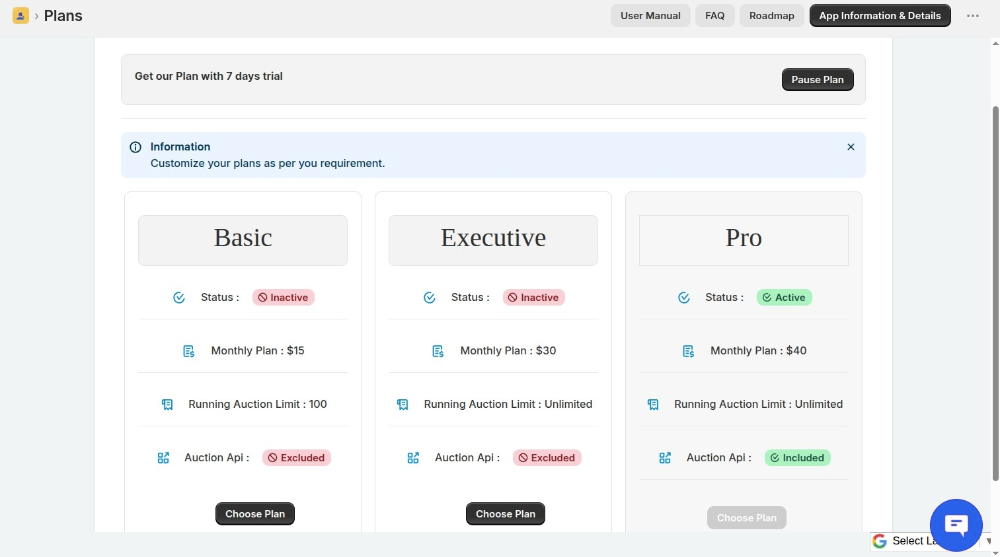
Pause plan: If you do not want to use the app for a while, you can pause the plan.
You will be charged 7USD per month for the paused plan.
Upgrade or Downgrade Plans
You can now upgrade or downgrade your Product Auction App plan directly from the app according to your business requirements.
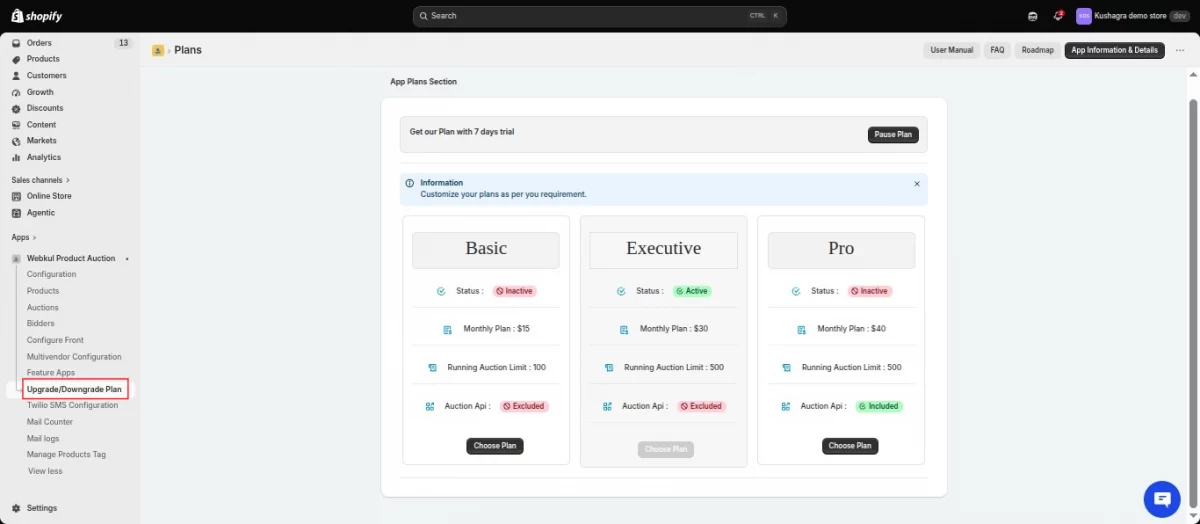
Once the payment is done for the plan, the Product Auction will be listed here: